Chef Infra Client Overview
Note
chef-client command line tool, see
chef-client(executable).New in Chef Infra Client 17
Chef Infra Client’s Compliance Phase lets you automatically execute compliance audits and view the results as part of any Chef Infra Client Run. The Compliance Phase replaces the legacy audit cookbook and works with your existing audit cookbook attributes. You can also set up the Compliance Phase for new cookbooks. See Compliance Phase documentation to upgrade.
| Chef Infra Client is an agent that runs locally on every node that is under management by Chef Infra Server. When Chef Infra Client runs, it performs all of the steps required for bringing a node into the expected state, including:
|

The Chef Infra Client Run
A “Chef Infra Client run” is the term used to describe the steps Chef Infra Client takes to configure a node when the chef-client command is run. The following diagram shows the various stages that occur during a Chef Infra Client run.
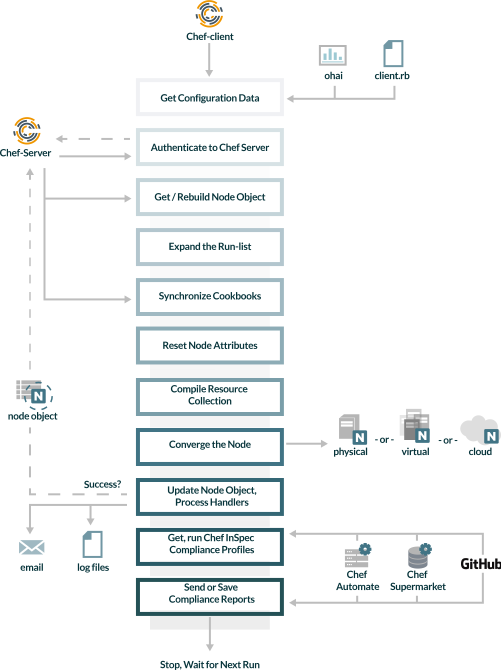
During every Chef Infra Client run, the following happens:
| Stages | Description |
|---|---|
| Get configuration data | Chef Infra Client gets process configuration data from the client.rb file on the node, and then gets node configuration data from Ohai. One important piece of configuration data is the name of the node, which is found in the node_name attribute in the client.rb file or is provided by Ohai. If Ohai provides the name of a node, it is typically the FQDN for the node, which is always unique within an organization. |
| Authenticate to the Chef Infra Server | Chef Infra Client authenticates to the Chef Infra Server using an RSA private key and the Chef Infra Server API. The name of the node is required as part of the authentication process to the Chef Infra Server. If this is the first Chef Infra Client run for a node, the chef-validator will be used to generate the RSA private key. |
| Get, rebuild the node object | Chef Infra Client pulls down the node object from the Chef Infra Server and then rebuilds it. A node object is made up of the system attributes discovered by Ohai, the attributes set in Policyfiles or Cookbooks, and the run list of cookbooks. The first time Chef Infra Client runs on a node, it creates a node object from the default run-list. A node that has not yet had a Chef Infra Client run will not have a node object or a Chef Infra Server entry for a node object. On any subsequent Chef Infra Client runs, the rebuilt node object will also contain the run-list from the previous Chef Infra Client run. |
| Expand the run-list | Chef Infra Client expands the run-list from the rebuilt node object and compiles a complete list of recipes in the exact order that they will be applied to the node. |
| Synchronize cookbooks | Chef Infra Client requests all the cookbook files (including recipes, templates, resources, providers, attributes, and libraries) that it needs for every action identified in the run-list from the Chef Infra Server. The Chef Infra Server responds to Chef Infra Client with the complete list of files. Chef Infra Client compares the list of files to the files that already exist on the node from previous runs, and then downloads a copy of every new or modified file from the Chef Infra Server. |
| Reset node attributes | All attributes in the rebuilt node object are reset. All attributes from attribute files, Policyfiles, and Ohai are loaded. Attributes that are defined in attribute files are first loaded according to cookbook order. For each cookbook, attributes in the default.rb file are loaded first, and then additional attribute files (if present) are loaded in lexical sort order. If attribute files are found within any cookbooks that are listed as dependencies in the metadata.rb file, these are loaded as well. All attributes in the rebuilt node object are updated with the attribute data according to attribute precedence. When all the attributes are updated, the rebuilt node object is complete. |
| Compile the resource collection | Chef Infra Client identifies each resource in the node object and builds the resource collection. Libraries are loaded first to ensure that all language extensions and Ruby classes are available to all resources. Next, attributes are loaded, followed by custom resources. Finally, all recipes are loaded in the order specified by the expanded run-list. This is also referred to as the "compile phase". |
| Converge the node | Chef Infra Client configures the system based on the information that has been collected. Each resource is executed in the order identified by the run-list, and then by the order in which each resource is listed in each recipe. Each resource defines an action to run, which configures a specific part of the system. This process is also referred to as convergence. This is also referred to as the "execution phase". |
Update the node object, process exception and report handlers | When all the actions identified by resources in the resource collection have been done and Chef Infra Client finishes successfully, then Chef Infra Client updates the node object on the Chef Infra Server with the node object built during a Chef Infra Client run. (This node object will be pulled down by Chef Infra Client during the next Chef Infra Client run.) This makes the node object (and the data in the node object) available for search. Chef Infra Client always checks the resource collection for the presence of exception and report handlers. If any are present, each one is processed appropriately. |
| Get, run Chef InSpec Compliance Profiles | After the Chef Infra Client run finishes, it begins the Compliance Phase, which is a Chef InSpec run within the Chef Infra Client. Chef InSpec retrieves tests from either a legacy audit cookbook or a current InSpec profile. |
| Send or Save Compliance Report | When all the InSpec tests finish running, Chef InSpec checks the reporting handlers defined in the legacy audit cookbook or in a current InSpec profile and processes them appropriately. |
| Stop, wait for the next run | When everything is configured and the Chef Infra Client run is complete, Chef Infra Client stops and waits until the next time it is asked to run. |